
Policy Support Agent
A built-in agent is provided specifically to offer guidance in understanding policies, for use by end-users. This is enabled by default for new accounts, and disabled for end users by default on existing accounts, but you can enable/disable it (as an admin) by going to Configuration / Main Settings and setting AI Webchat to Yes/No: 
You can also access the Support Agent (even when it's disabled) if you are an admin, on the Lists menu option in the hamburger menu - go to Support Agent in there. This is useful for testing the support agent before rolling it out to all users.
Once the AI Webchat is enabled, the Questions box will start using the AI agent chat format, allowing instant responses from the AI.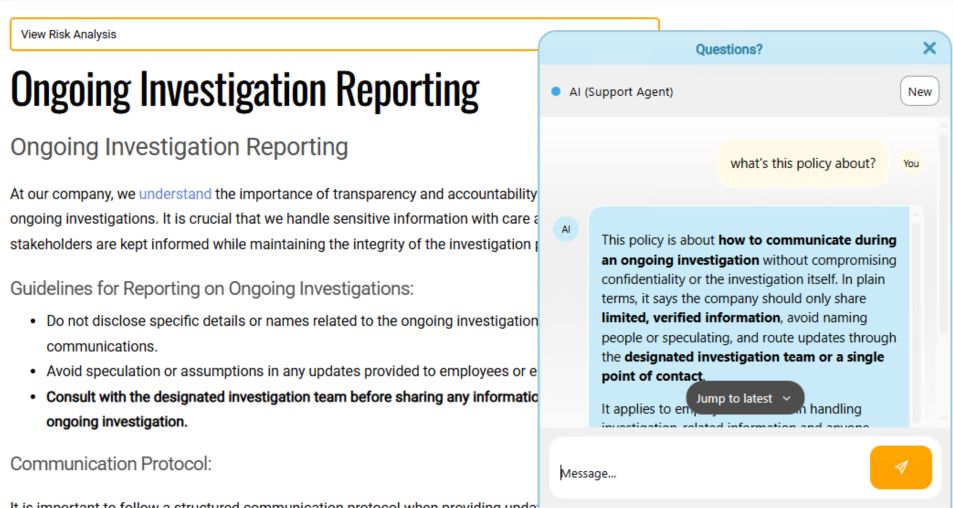
This is handled by a different agent that you can find on the hamburger "Lists" menu, and inside there you will click "Support Agent". An admin can then modify the settings for that agent by using the cog icon on that page. An admin should also be able to see all previous conversations in that same area.
The Support Agent will not be able to access its own web browser, nor make any changes to the system, neither can it talk to any other agents - for security reasons. Its purpose is purely to answer questions about policies, either the policy the user is on, or finding other policies they can access (even on other tabs). The agent cannot access policies that the user does not have permission to view.
You'll also be able to access the Support Agent via the search box in the wiki - enter in a question there, and it'll switch to the agent chat window where you can get answers and ask for explanations to dig deeper.
To manage costs, an admin can set up the maximum conversations per day and maximum number of conversation turns per conversation (per user). This is recommended if the support agent is made available to all users. You can learn about these here.