
Customer Service
Support Tickets
Have any questions? Use the Questions box below, or click here to access the Tickets tab to create a new ticket.
Account & Billing Changes
For customers who signed up on our website, click this link to get to the billing and subscription portal. You can use that portal to change subscription levels, add/remove Wiki Managers and more.
Note: Remember to use the email that you entered when you first signed-up.
If you have any difficulty accessing this, or have any other questions, please email us at support@staff.wiki.
Updating Your Subscription
Once you are in the portal, you will see something like this. Click your active subscription to make changes, such as adding an additional Wiki Manager license. 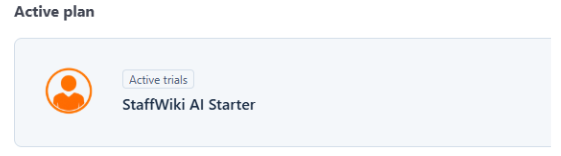
Click Update Plan to modify the plan you are subscribed to.
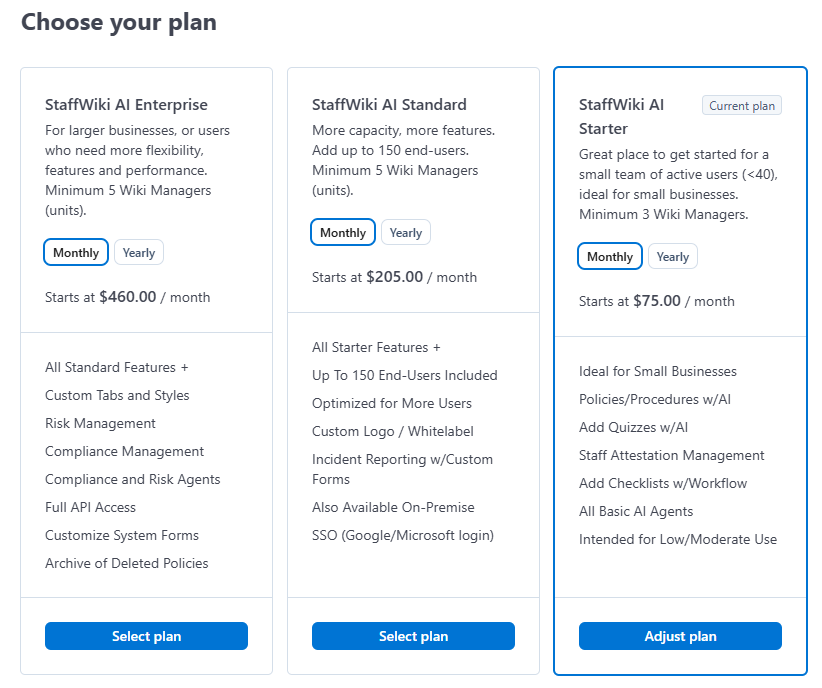
If you are not changing your account level, and instead are just updating the Wiki Managers for your current subscription, click "Adjust Plan" on your current plan.
On that screen, you will be able to modify the Quantity - which refers to the quantity of Wiki Managers: 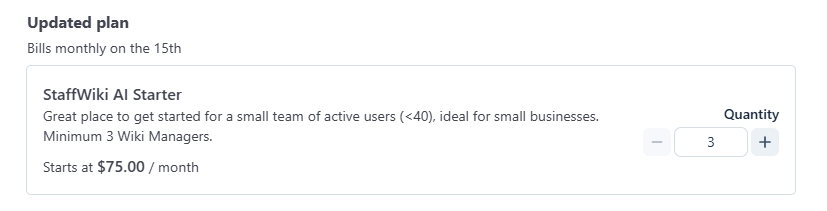
Once you have made the adjustments, click "Confirm" to apply the changes to your account. You should have the additional Wiki Manager licenses available a few minutes later.